Greetings, those of good will.

I've created this blog to register my experience through this PhD in London, UK. Welcome to a space for discussion of new ideas within digital interfaces, eye tracking, assistive technology, natural user interfaces, physical and tangible computing, gestural interfaces, upcoming devices, web 2/3.0, augmented reality and beyond.
Showing posts with label NUI. Show all posts

Tuesday, 24 September 2013

Haptix: Multitouch Reinvented

Funded! This project successfully raised its funding goal on Sep 13.

Transform any flat surface into a 3D multitouch surface to control your computer, TV, or any other screen.

Update 1: Announcing the $150,000 Stretch Goal: Pressure Sensitivity. Learn more here!
Update 2: Haptix: both a mouse and a... keyboard? Check it out here!
Update 3: Design in 3D or play first-person games with only your fingers! Check out some awesome videos of Haptix!

Work or play, make life easier with Haptix.

Multitouch is fun and natural to use, but it's only present on a few devices. Because tablets and smartphones are easy to use, they're also easy to enjoy. But as great as multitouch screens are, it's still hard to beat the mouse/keyboard combo when it comes to productivity. We wondered if it was possible to combine the best of both worlds -- introducing Haptix.
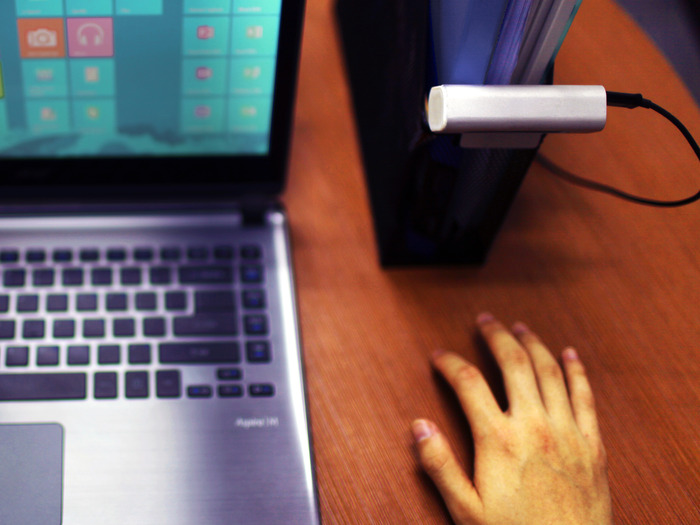
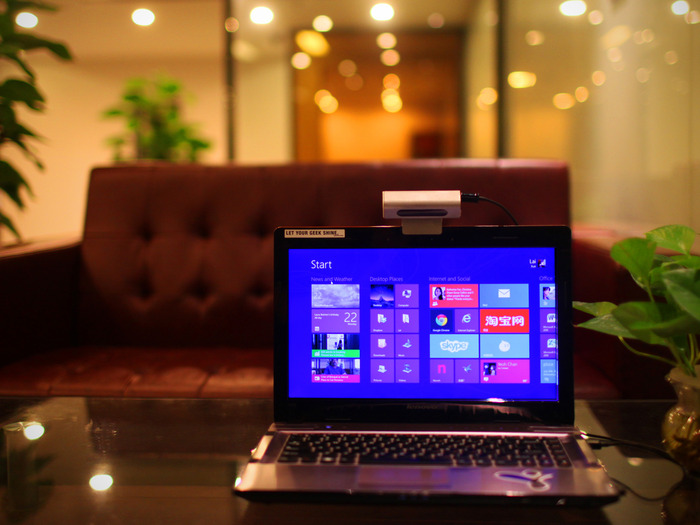
Haptix turns ANY surface into a multitouch surface. It's a sleek bar that you can place flat or clip on something elevated to enable multitouch on any flat surface, such as a table, window, or screen. You can then control any computer by tapping, pinching to zoom, or swiping to scroll on that surface itself. It's as intuitive and natural as a multitouch screen, just without the actual screen.
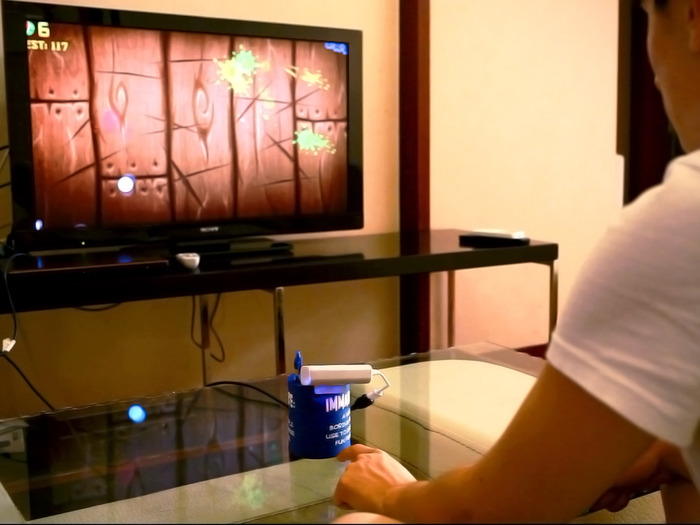
Using the TV becomes natural again

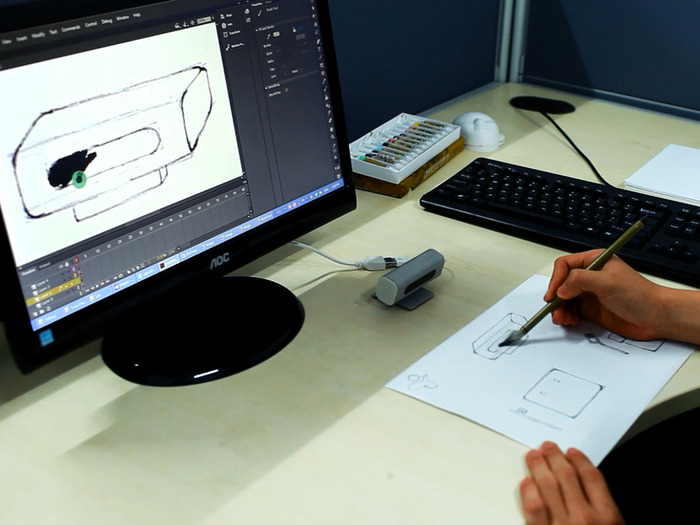
For artists and engineers alike -- capture your pen/brush strokes with Haptix
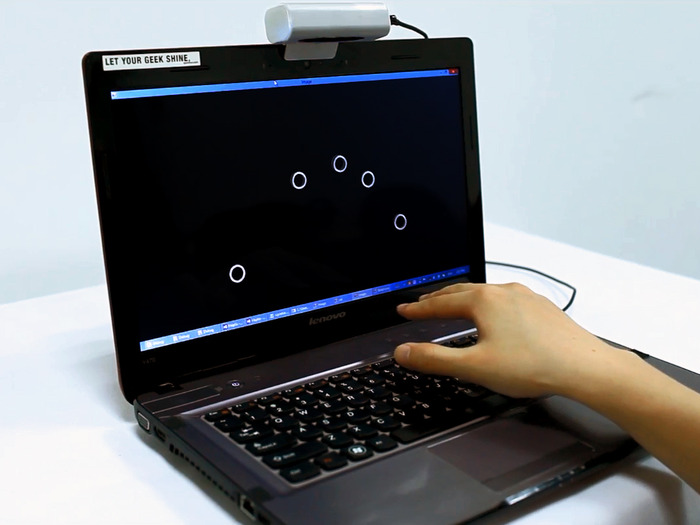
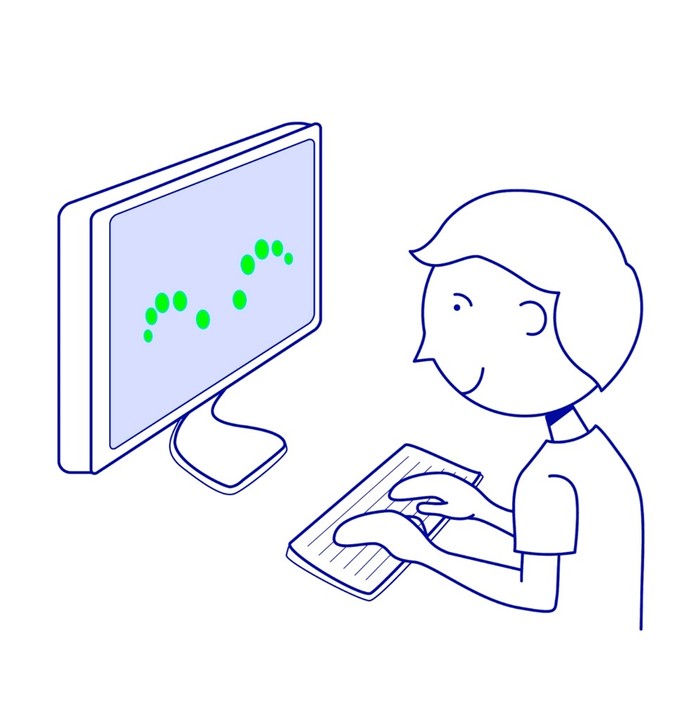
But it's more than just multitouch - it's 3D multitouch. Even when your fingers are above the surface, you see them appear on the screen. This way, you know exactly what you're selecting when you tap the surface. To click on a link, simply move your finger over the link and tap down; it's so much faster than swiping on a trackpad. When you're touching what you see, it's just like reaching out and touching the screen itself, except your hands are well-rested right in front of you.

See your fingers before they touch the surface
Controlling anything becomes much easier. Whether you're using your laptop or your TV, you get to enjoy the intuitive multitouch experience we know and love. Tap on a link to open it? Pinch to zoom in on a picture? Swipe to get those falling fruits? Do it all from the comfort of resting your hands on a surface.

Haptix is a mouse-killer.

Can Haptix replace the mouse? We believe it can. Point it at your table, and bam, use your hands as your mouse and much more. Haptix can be used in 3 modes:
  • Multitouch
  • Trackpad
  • Mouse
You can either treat the surface like a multitouch screen or a trackpad, or define different functions for different fingers. For instance, you can use your middle finger as the cursor, your index finger to left click, and your ring finger to right click. We haven't used the mouse in a while, and we haven't found the need yet.

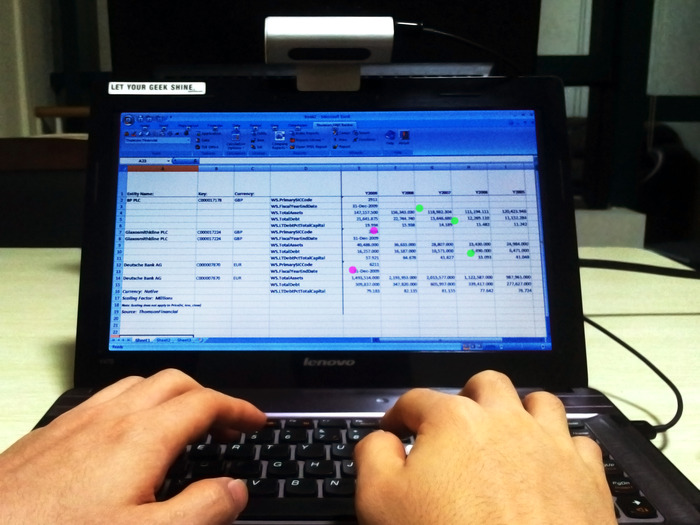
Make Excel simpler with five-finger multitouch

No mouse? Use your hand instead.

Create two layers of interaction with 3D multitouch.

3D multitouch adds a layer of 3D sensing on top of a layer of multitouch. These two forms of interaction complement each other perfectly and each makes up for what the other lacks. Your fingers' positions are captured even before they touch the surface, so you know what you're controlling when you tap or pinch on the surface.
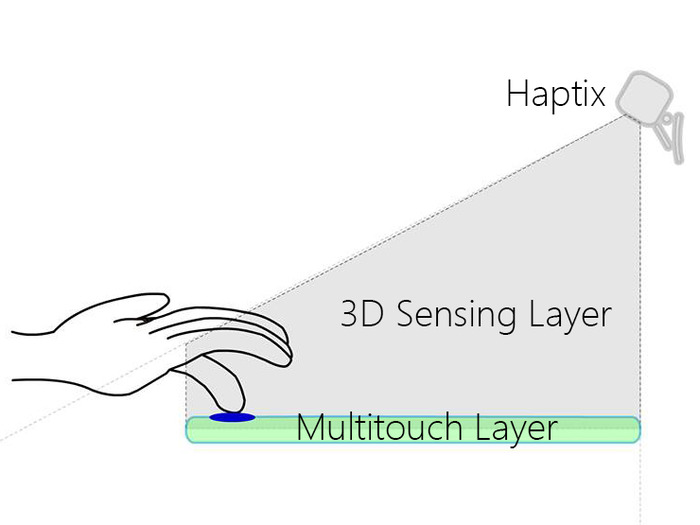
3D multitouch takes a completely different approach to 3D sensing that solves fundamental problems with 3D sensing today. Other solutions require you to hold your hands in the air, which can be awkward and makes precise control almost impossible. With Haptix, you get 3D sensing that:
  • Gives you tactile feedback (the satisfying feel of touch)
  • Allows you to rest your hands on a surface
  • Lets you define the space of operation
  • Allows you to control things on a surface with precision
  • Has practical applications in improving productivity
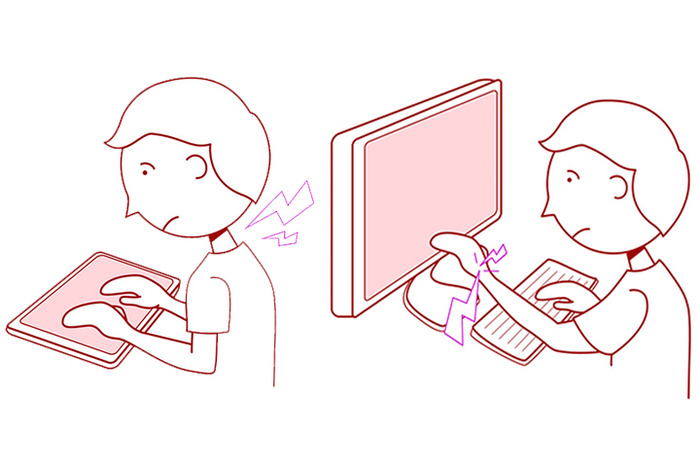
3D multitouch moves multitouch away from screens. Portable multitouch is one of the best things to happen to multitouch. If you have a tablet, you're looking down while using it and your neck might hurt over time. Or if you have an ultrabook, you're constantly reaching out and your arm hurts over time. And even in both these cases, your hands cover part of the screen (plus smudges). With 3D multitouch, these problems just go away.

Using a tablet/multitouch screen

Using Haptix
Using Haptix
Haptix is based on patent-pending breakthrough algorithms in computer vision and image processing. We've rejected virtually every conventional method of making such things possible and formulated better techniques to take their place. Haptix tracks the 3D coordinates of fingers and calculates their positions relative to the surface, and it works through the same principle as how our eyes see things (aka stereo vision). Since Haptix doesn't rely on infrared or thresholding, this makes Haptix the first affordable 3D sensing solution to be able to be used while looking down at a surface, under ANY lighting condition, and while on the go.

A few ways we love using Haptix:

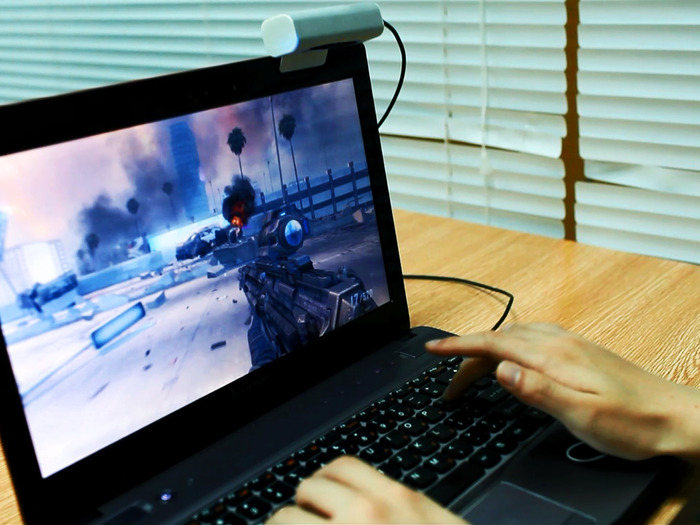
Clip it on top of your laptop. Turn your keyboard into a multitouch keyboard, and then control your computer ENTIRELY FROM your keyboard. The surface of your keyboard becomes a multitouch pad, so you glide your fingers across the top of the keys. Remember those pesky Excel sheets that make you keep going between mouse/trackpad and keyboard? Remember wanting to play a first-person shooter game but not having your mouse? With Haptix, those days are gone. To set it up, simply plug it in, do a quick four-point calibration, and you'll be up and running! Worried about typing? Don't worry, Haptix automatically deactivates when you type.
Haptix works on Windows XP/Vista/7/8 and Ubuntu
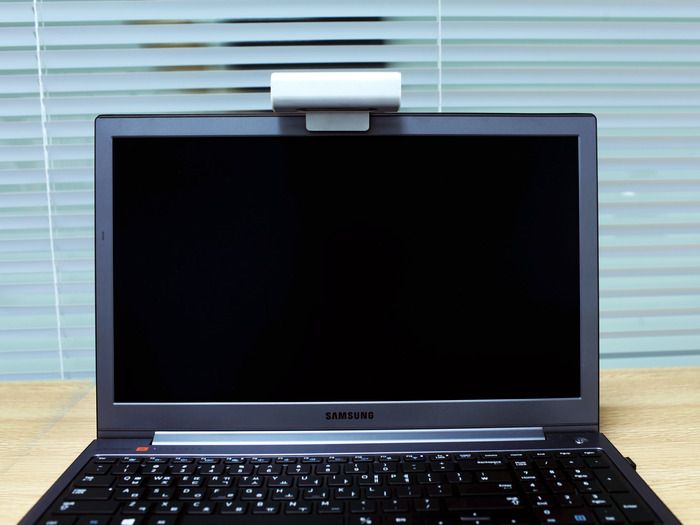
Leave Haptix on your laptop

At last, first-person games on the laptop
Put it on your sofa while you watch TV. It's nice to have a personal multitouch remote in front of you while you're watching TV. Flipping through videos or apps becomes a breeze.

We're working hard on great hardware and production quality.

Haptix has an anodized beadblasted aluminum casing for a great look and feel. Having tried various materials, we believe that nothing beats a sleek aluminum finish, and we hope you agree.

An anodized glass-bead-blasted aluminum finish
We want Haptix to be as high-quality as possible. Currently, Haptix's dimensions are 3 x 3 x 8 cm with a 120° field of view. But we're moving to a 150° angle with vastly better lenses, and are working hard to shrink the electronics without increasing costs. So you can bet that Haptix WILL get smaller.
Haptix is basically a camera. Or more specifically, Haptix consists of two CMOS image sensors (those you find in your webcams), which capture the position of your hands in 640x360 resolution, attached to a microcontroller, which does most of the processing so your computer doesn't have to. It works with visible light, but employs infrared when environmental illumination is low, so it works in the dark too! Haptix connects to your computer through a USB 2.0 cable.

A peek inside Haptix's electronics
We have great manufacturing partners. With the help of some of the most experienced veterans in the Chinese manufacturing scene, we're working closely (so close we're literally in the same city) with manufacturers to get the best quality product into your hands.
  • Aluminum factory: We've made molds for the aluminum and plastic parts.
  • Component suppliers: We've tested samples of image sensors and other components from suppliers, and have secured the best ones.
  • Contract manufacturers: We've gone back-and-forth over schematics, assembly, and packaging -- finalizing tooling will be our next step.
  • USPS: For when we're ready to ship!
Here's our projected timeline:
  • November: Perform a sample production run, then debug and test
  • February: Start shipping

What's next?

Support for Android and OSX. We want you to be able to use Haptix with your Android smart TVs and MacBooks, and are hard at work on that. We'll make sure Haptix works on those platforms by the time it ships!
Developer SDK. Haptix integrates with your system right out of the box, which means that you can use it with pretty much any program. But you may have ideas (the crazier the better) on how you'd like to manipulate tracking data from Haptix (from 3D motion sensing to gesture control), and we want you to try those out!
360° hinge. The front piece on Haptix's clip doesn't interfere when you close your laptop (it's as thin as a credit card), so our next step in making Haptix something you can leave on your laptop all the time is to design a cost-effective hinge for Haptix that allows you to bend it all the way back. This way, Haptix can sit unobtrusively on top of your laptop when you pack it in a bag.

We need you.

We can't wait to get Haptix into your hands. Our Kickstarter will fund refinement of the electronics and additional tooling for mass production. It'll also give us an idea how many to include in our first production orders, so it's your chance to be the first to enjoy interacting with your computer in an entirely different way. If we go over our Kickstarter goal, we'll be able to develop additional features for you such as different colors and other cool stuff we have planned. More on that later!
Join us! When you use Haptix for the first time, you'll have the satisfaction of knowing that you helped make it happen. Take part in this movement to change how YOU interact with your computer.

Let 3D multitouch improve how you interact with computers - for good.

A huge thanks to our friends and mentors from The Iron Yard startup accelerator, Zhexiong Manufacturing, and the Thiel Foundation!

Risks and challenges Learn about accountability on Kickstarter

Quality is our biggest concern and our greatest emphasis while manufacturing in China. Haptix is composed of several different parts that is sourced from different suppliers. Managing the quality of these different parts, especially when they come together, will be difficult. But we have visited suppliers and contract manufacturers to ensure that Haptix can be manufactured with great quality, and we certainly won't let our standards stoop. This has given us enough confidence to know that we will be able to deliver Haptix as a great quality product, no matter what.

Wednesday, 6 March 2013

HCID Open Day 2013: Investigating Perceptible Affordances of Touch-Based NUIs - Jacques Chueke, City University London

HCID Open Day 2013: Investigating Perceptible Affordances of Touch-Based NUIs - Jacques Chueke, City University London
Centre for Human Computer Interaction Design
Wednesday, April 17, 2013 from 5:10 PM to 5:40 PM

London, United Kingdom


HCID Open Day 2013: Investigating Perceptible Affordances of Touch-Based NUIs - Jacques Chueke, City University London
And the review with slides, pictures, etc: http://hcid.soi.city.ac.uk/cityinteractionlab/blog/hcid2013-review/
And a link to the pictures: http://www.slater-king.com/gallery/CU-HCID2013

Sold Out

Apr 17, 2013

Title: Investigating Perceptible Affordances of Touch-Based NUIs: New Designs Paradigms for Novel Interactions

Abstract

This research investigates Perceptible Affordances and their role in informing users about visual cues for interaction with emerging NUI (Natural User-Interface) technologies, specially touch-based interactions. Issues with with an iPad were identified, which concern the inability of users to spot hidden menus, some object manipulation features and OS gestures. All of these were deemed unfamiliar to users with different expertise (from novices to expert users). This presentation will describe the next goal for this research which is testing three iPad affordances libraries that will be compared by means of a practical investigation with a between-groups design. This empirical case study aims to unveil which version users would be keener to adapt and adopt and thus which designs and UI behaviours could present better-adapted perceptible affordances for touch-based interfaces that conceals unfamiliar interactions.

Bio

Jacques Chueke graduated in Graphic Design and has a Master in Design from PUC-Rio, Brazil, with specialisation in Interface Usability. He's been working for 10 years developing projects for Internet and Software for large companies along with teaching about Interface Usability and Digital Image in different Universities and Institutes. Has a PgDip in Digital Arts from the University of Plymouth, i-DAT Centre (2010). He joined the Centre for HCI Design at City University in October of 2010 as a MPhil/PhD student, supervised by Dr. George Buchanan and Stephanie Wilson. He is sponsored by CAPES - Ministry of Education, Brasília, Brazil.

This event is part of series of FREE talks and seminars to be held at City University's Centre for HCID as part of an open day, to find out about more of the other sessions please click here

Thursday, 18 October 2012

Another great UPA event: You can't touch this: NFC, speech interaction and other cool stuff

You can't touch this: NFC, speech interaction and other cool stuff.
About the event
As technology develops there are more and more possiblities for interacting with computers in new ways. This event will attempt to provide some insights on the UX challenges of working with systems that use more natural user interfaces. What are the principles for designing for these interfaces and similarly what can we learn from the design?

"That can't be natural!" Eamonn O'Neil, University of Bath
We humans communicate face to face with each other primarily through dynamic, fast-flowing combinations of speech and gesture.  Until recently, however, we have been obliged to communicate with computers primarily through a keyboard, mouse and visual display.  The technology is now becoming available, for the first time, to allow what may be viewed as more natural forms of interaction: motion and orientation sensors, barcodes and RF tags, speech input and output, etc.  But is this kind of interaction natural?  Well, no; it's designed.  So we'd better figure out how to design it well.

"Enhancing the mobile user experience with NFC'" Neil Garner, Proxama
Neil will present a summary of the things that NFC can do to make using a mobile phone easier and describe some of the applications Proxama have already deployed for customers around payments, loyalty, marketing and app engagement.

"Siri loves you, but do you love Siri?" - Jiri Siftar
After years spent in labs, experimenting with obscure and prototyped voice-driven intelligent systems, HCI research was given a nice present - a working system in the pockets of millions around the globe. Everybody knows Siri, many talk about it, some say they use it, but actually very little do we know about the reality here. It was about time to ask real users in the real world whether they use Siri, how and why. A combination of a globally distributed online survey and interviews brought up an interesting data, which might be useful for the design and application of similar systems, not only in a mobile context.

Sponsor of the event
We are still looking for a sponsor for the event. Please contact Dave Grayson at secretary@uxpa-uk.org if you are interested to sponsor the event

Logistics of the event
Date - Thursday, 18 October 2012
Time - 6:30pm for 7pm start
Location - SapientNitro, 8 Spital Square, London, E1 6DU
Twitter: #canttouchux

There is no charge for UPA members.
For non-members the cost is £10 payable on the door.
For student non-members £5 is payable on the door.

Format of the evening
6:30 - 7:00 :: Drinks and Nibbles
7:00 - 8:15 :: Talks
8.15 - 8.45 :: General Q&A with all speakers
8.40 - 9.30 :: Networking

About the speakers

Eamonn O'Neil is a Reader in Human-Computer Interaction in the Department of Computer Science at the University of Bath.  He has just completed 4 years as a Royal Society Industry Fellow with Vodafone Group R&D, looking at intelligent mobile services. He led the Cityware project which brought together computer scientists, interaction designers and architects in a multidisciplinary approach to pervasive computing systems.  He was Academic Coordinator of the multi-institution project User Interactions for Breakthrough Services funded by the EPSRC and Mobile VCE, a partnership of 13 of the world’s most prominent mobile communications companies and 12 UK universities.  He has just started a 4 year project involving the universities of Bath and Oxford targetting sustainable and sustained changes to the energy demand behaviours of building occupants.

Neil Garner, Proxama
Neil founded Proxama in 2005 (then called Glue4 Technologies). The business focused on creating services that link people and brands using consumer technologies. In 2008, the company was rebranded as Proxama with a focus on the applications of mobile, smartcard and NFC technologies. Neil passionately believes in using emerging technologies to create valuable services for people.

Jiri Siftar is a London based UI/UX designer. Started in 2000 back in the Czech Republic, his experience includes award-winning children portal, tens of educational multimedia titles and websites. After moving to the UK in 2007 he worked mostly on interfaces of B2B solutions for clients including Waitrose, Barclays or NHS. During that time he acquired BSc in Psychology & Computing, most recently followed by MSc in HCI at UCL. Currently exploring London UX scene and enjoying to be paid for instagraming.

Saturday, 4 August 2012

LEAP: Say goodbye to your mouse and keyboard

Can't get enough of the LEAP concept:

Say goodbye to your mouse and keyboard.

Leap represents an entirely new way to interact with your computers. It’s more accurate than a mouse, as reliable as a keyboard and more sensitive than a touchscreen.  For the first time, you can control a computer in three dimensions with your natural hand and finger movements.

This isn’t a game system that roughly maps your hand movements.  The Leap technology is 200 times more accurate than anything else on the market — at any price point. Just about the size of a flash drive, the Leap can distinguish your individual fingers and track your movements down to a 1/100th of a millimeter.

This is like day one of the mouse.  Except, no one needs an instruction manual for their hands.


Link for the blog: https://live.leapmotion.com/blog/

Wednesday, 28 March 2012

Microsoft Surface 2.0 on Samsung Exhibit

The Interaction Lab manger and my friend Raj Arjan invited me to the Microsoft Surface 2.0 launch event in London this Wednesday 28.


We could see the device now manufactured by Samsung SUR40 running Windows 7 and MS Surface Shell.

We could chat with Olivier Bessieres, EMEA Director MS Surface and Dave Brown, Technology Evangelist from Microsoft.

Olivier mentioned the focus on collaborative work and information exchange in real-time being presented on the screen of the new Surface.

Dave who presented his mind blowing NUIverse app.


I've asked Dave Brown, regarding NUI and Post-WIMP interfaces: What should come first? User action or the visual cue? He replied:

Some visual cue that would suggest that you can touch the thing could be there already - and then the user could get further that are more specific about what should he do could ease the interaction. He added, only presenting the available options when the context demands it avoids burden from the user side. He finished saying: I don't think there is a single answer to it. It's all about context.

Below, an image about the hidden menu issue (no perceptible affordances) which I'm tackling with during the course of my research:


Dave mentioned some significant improvement brought by the powerful Samsung SUR40 table is that the second MS Surface has a much better low latency screen: 100ms of delay.

Now the software detects finger shape in order to change the screen towards user orientation.

Even better, he's applying the 'readable tags' concept: physical objects with tags within being read when placed over the screen.


At the end I could spot a very good Perceptible Affordance solution for returning to home screen:


Thank's Raj, for the opportunity!

Some more links about the event and the new MS Surface/Samsung:

Microsoft Surface 2.0 Tablets available for Pre-Order from Samsung Re-sellers


Samsung demos SUR40 display with Microsoft Surface 

Microsoft Surface with PixelSense pictures and hands-on

Thursday, 15 March 2012

My presentation at the SCIENCE WEEK EVENT at the BCS

Did my presentation with my supervisor at the BCS. Great honor, by all means.

Forthcoming events

.

Thursday 15th March 2012

title : Beyond mouse and keyboard: Post-WIMP and novel forms of interaction
speaker : Dr. George Buchanan and Jacques Chueke, Centre for HCI Design, City University, London
venue : BCS, Southampton Street, London, arrive 18:00 for a 18:30 start
SCIENCE WEEK EVENT

The introduction of novel hardware for computing and gaming during the last decade is changing the way we control everyday devices because it provides, for instance, haptic, gesture-based, voice activation and eye tracking interactions. Dr Buchanan will describe the work being done at the Centre for HCI Design on new types of interaction, and Jacques will report on his PhD project to investigate the cognitive issues that these new technologies present to the user, and how the user explores interfaces that are new and visually unfamiliar.

Dr Buchanan is a Senior Lecturer in the Faculty of Informatics, Centre for HCI Design. His research interests encompass information interaction: from web search, through browsing digital libraries, to accessing information on a mobile phone. His main current interest is to discover how people interact with newly found documents, and how computer technology can assist users to make better informed and relevant decisions.

Jacques worked for 10 years on internet and software projects for large companies in Brazil, and has taught at PUC-Rio. He has been a PhD student in the Centre for HCI Design since October 2010.

Monday, 6 June 2011

Technology for TUI, NUI and Post-WIMP Interactions

Great investigation from my friend Meirion Williams, about NUI, TUI and Post-WIMP. Link to his presentation online, during the OpenDay from HCID 2011.

Anoto io2 Digital Pen - Ghandi clinical handover project

Zeal GPS Ski Goggles - googles with mini display
NEC TeleScouter - display projected into eye
Tobii X120 - eye tracker (we've a x60 at the Interaction Lab)
Tobii PCEye - new small eye tracker, mounted under monitor <£5000 cost
Tobii / Lenovo eye tracking laptop prototype: http://www.youtube.com/watch?v=GFwhx0Wy8PI and http://www.tobii.com/en/group/news-and-events/press-releases/the-worlds-first-eye-controlled-laptop/
eviGroup Paddle Pro - head tracking tablet PC (webcam)
Nintendo DSi - webcam head tracking games
also look at Sony PS3 for more head tracking games - eg GT5 you can look around the car with your head.

Primesense - make the gesture control hardware used in:
- Microsoft Kinect
- Asus Wavi XTION - TV media gesture control system

Primesense also ran gesture controlled browser competition
winner: Stolarsky 'SwimBrowser'
2nd place: Xie et al 'Kin Vi': http://youtu.be/IosmAD10AKg
Toshiba, Samsung, Hitachi - all developing gesture control TVs: http://gigaom.com/video/show-of-hands-gestures-control-hitachi-tv/
Epoc Emotiv - brain control headset
Washington Uni brain implant research
Mindflex - simple brain ball game

Tuesday, 19 April 2011

HCID2011: Post-WIMP and Novel Forms of Interaction

The HCID 2011 was a HUGE success.

Enjoyed very much talking about Beyond Mouse & Keyboard: Post-WIMP and Novel Forms of Interaction in our HCID2011 at the Centre for Human Computer Interaction Design.

Link to my presentation online.

You can see more pictures, videos and presentations at the HCID Blog, and a link to the Flikr page.

And the idea spreads on Twitter and other blogs...


 Feedback about my talk within Tweeter:

 Microsoft keynote speakers:

 Google keynote speaker:

Friday, 1 April 2011

April's Fool by Google: Gmail Motion BETA

Everything to do with my research, anyway:

A new way to communicate

The mouse and keyboard were invented before the Internet even existed. Since then, countless technological advancements have allowed for much more efficient human computer interaction. Why then do we continue to use outdated technology? Introducing Gmail Motion -- now you can control Gmail with your body.


Tuesday, 1 March 2011

Some thoughts and updates about conferences...

Managed to accomplish all feasible deadlines for this year conferences. Let's hope I'll get a place on them...
 
1. ACM SIGCHI Symposium on Engineering Interactive Computing Systems
http://eics-conference.org/2011/index.php?content=1
From: June 13-16, 2011
Short Paper: February 10, 2011 Title: Interface Behaviour of 2.0 & 3.0 Websites: iGoogle Usability Evaluation with Eye Tracking (SENT)
Final decision notification: March 17, 2011, 23:59 PST
Doctoral Consortium: February 10, 2011 title: Investigating TUI and NUI Technologies: Bringing Improvements to the Visual Feedback and User Experience (SENT)
Review notification: March 17, 2011, 23:59 PST
Where: Pisa, Italy.

2. INTERACT 2011: 13th IFIP TC13 Conference on Human-Computer Interaction
http://interact2011.org/
From: 05 to 09 September 2011
Full Paper: January 24th, 2011 Title: Beyond Mouse & Keyboard: from Desktop Metaphor towards Natural User Interfaces (SENT)
Acceptance notification: 28 March 2011
Where: Lisbon, Portugal.

3. HCI2011 – is Health, Wealth & Happiness. 25th BCS Conference on Human Computer Interaction
http://hci2011.co.uk/site/
From: 4th to 8th July, 2011
Short papers/posters/work in progress (6 pages max): 18 February 2011 Title: Interface Behaviour of 2.0 Websites: Affordances within Personal Web Portals (SENT)
Notification: 8th April 2011
Where: Newcastle-upon-Tyne, UK.

Thinking of re-naming my thesis with the following title (that came from you George...): TUI and NUI: EXPERIMENTATION WITH RESPONSIVE VISUAL FEEDBACK FOR NEW AND UNLEARNED INTERACTIONS.

Friday, 11 February 2011

Evan Grant from Seeper

Through my 1st supervisor, George Buchanan I was able to meet today the founder of a collective called Seeper, company that creates interactive digital installations. Evan Grant is founder of collective seeper. He started the company during his first year of study at Bournemouth University and has been working for the past 10 years as a director, developer and producer with a self-applied remit for innovation led wonderment.
Exploring natural user interaction and ubiquitous computing to create multi-sensorial experiences and memories. 2008 has seen Evan working with the likes of Sony PlayStation, Glastonbury Festival, Unilever and Aldeburgh Music.

BBC
We had the honour of a feature spot on the BBC. Appearing on Breakfast and evening news, alongside newsnight, newsround and the BBC online homepage! We became the most watched video of the day! Read More
IMG_5491_1080
The birth place of Volkswagen. As a classic VW geek how could I resist. That reminds me, here's my long lost love :( Read More

IMG_5181_sm
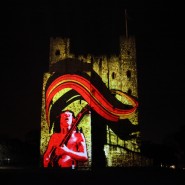
ACDC Vs Iron Man 2 - Architectural Projection Mapping on Rochester Castle
My latest project, working with the team to projection map Rochester castle for ACDC Vs Iron Man!

Read More
TEDActive_Talk1
I had the pleasure of being invited to talk and exhibit at TED in Palm Springs last week. Here's some new coverage: Read More
sm_yellcubes
Check out my latest venture into the world of 3D architectural projection mapping!

Read More
IMG_7035_470px
Take a look at some of our latest work at TENT Digital as part of London Digital Week.

Read More
pic_StandingWave_Desc_sm
We've just launched the new Cymatics Community website!
www.cymatics.co.uk

Read More
Credit: TED / James Duncan Davidson
First let me apologise for being the slowest blogger in history. 8 months between posts, shocking! Ableit to say I've been super busy doing all sorts of crazy, wonderful things. One of which being last week's TED Global conference in ...Read More
InteractiveSphere_TENT_sm
My company seeper have been commisioned by Dezeen architecture and design magazine and Tent Digital to exhibit our latest at London Digital Week Read More
3341977074_dee16a2dfd
Last week I worked as curator of installations at the Future Cinema Watchmen party/screening. My company seeper created (among other things) a multi touch, sound and lighting installation using the holographic delights of Musion.
Read More